
On this page
Build a powered station first. Then use the station’s research/science machine to queue Logistics I. Once that research is complete, conveyor belt construction becomes available. In the current demo, the station’s power comes from station-side generation; a docked ship does not solve it, according to a community-tested report.
The confusion is understandable. The mission text tells you to connect machines with a conveyor belt, but does not expose belts in the build menu. The official demo screenshot shows Logistics I in a research queue at 0/10, which supports what players found: this is a progression gate, not a missing item.
The following route is split into the part that is visible in official material and the part that comes from player testing. It reflects the October 21, 2026 demo hotfix.
Step 1: Give the station power
Place station-side power generation before you queue research. In the community thread that documented this blocker, the working sequence was:
- Build a generator on the station.
- Supply it with the power/fuel item it accepts.
- Place the research machine on the same powered station.
- Feed the research machine the input it requests.
The player who reported the issue had a powered ship docked at the station, but the research machine still had no power. That suggests the docked ship and station do not share a power pool in the current demo. Treat this as a player-tested limitation, not a permanent design promise.
The official tutorial does not clearly list the station-power step. The exact generator, fuel item and build menu labels may have changed since the report. Check the machine’s configuration panel for its power requirements.
What to check before you build research
- The generator is actually on the station, not only on the docked ship.
- The generator has a fuel or power input connected.
- The research machine is powered and is not showing a red power state.
- The science/research input is present in storage or the machine’s input.
- The station itself is powered rather than only being physically built.
The developer describes station power as a real constraint: mining drone bays and machines require enough power to run. The specific solution in the current demo is the part learned from players.
Step 2: Queue and finish Logistics I
Open the station’s research interface. The official research screenshot shows a queue entry for Logistics I with a 0/10 progress indicator and an “Unlocks” panel beside it. The same screenshot shows the Automation branch continuing to Mining Drones, Computation Science and Logistics II.
- Interact with the research/science module on the powered station.
- Add Logistics I to the research queue.
- Supply the research machine with the correct research item.
- Wait for the queue to complete; check that station power stays stable.
- Return to the build menu and look for the conveyor build option.
Do not assume that “research complete” means “all belts unlocked forever.” Later logistics technology may add more options. For the first belt, the current demo progression is Logistics I.
Step 3: Build the first belt without making a mess
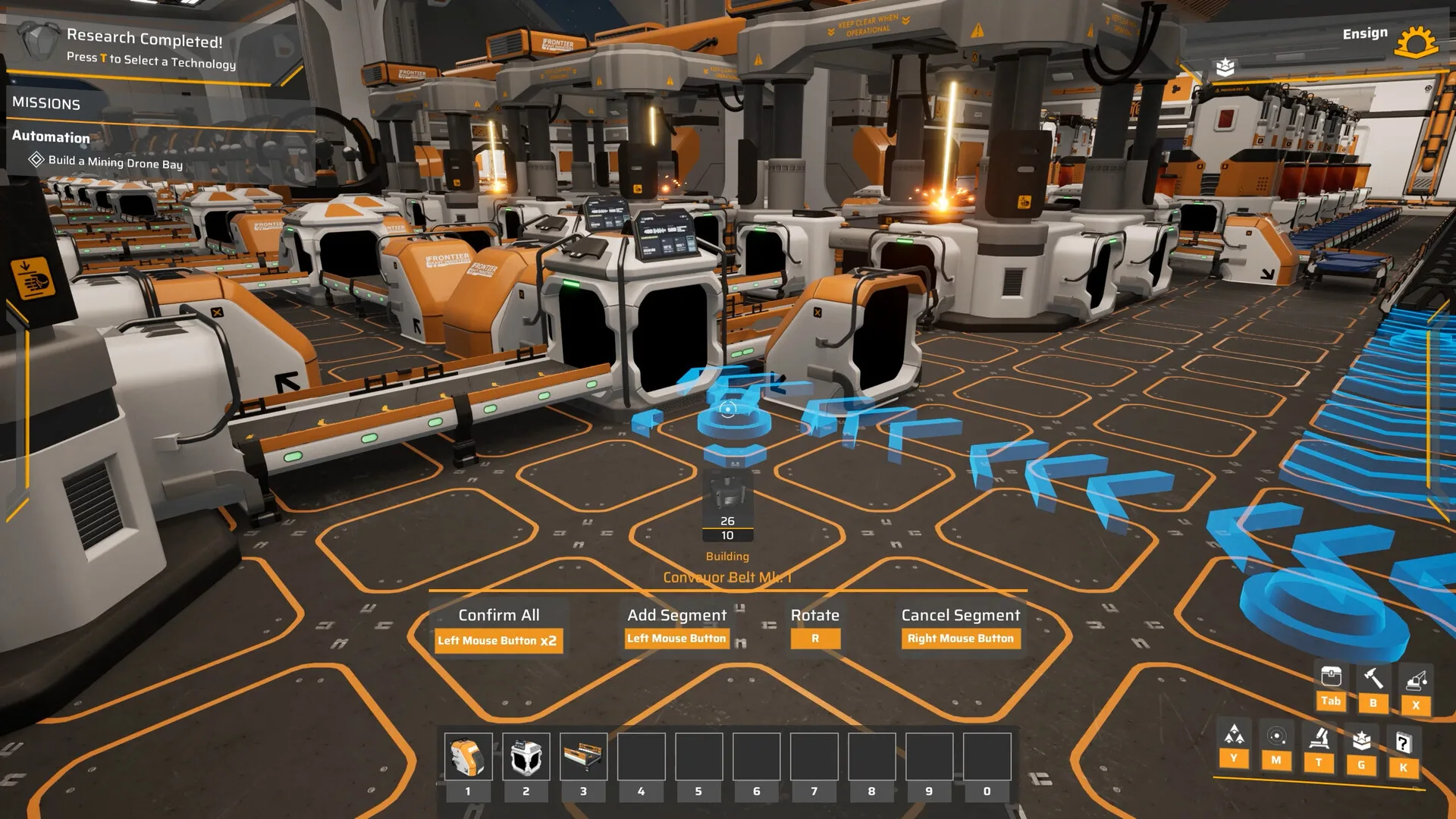
The official build screenshot identifies the tool as Conveyor Belt Mk. 1. Its on-screen build controls show:
- Confirm All for the selected line.
- Add Segment to continue the route.
- Rotate to change direction.
- Cancel Segment to undo the current segment.
Start with a short, straight connection between one output and one storage or machine input. Do not build a decorative loop before you know the item can travel the route.
A reliable first belt test
- Place a machine with a completed recipe.
- Place a container or the next machine directly beside it.
- Connect the output to the input with a short belt.
- Supply the source manually and watch one item move.
- Only then extend the line or add a splitter.
Troubleshooting checklist
| Symptom | Check first | Status |
|---|---|---|
| No conveyor in the build menu | Logistics I research complete, station is powered, current demo build installed. | Community-tested / visible gate |
| Research never progresses | Station generator running, research machine powered, correct research item supplied. | Community-tested |
| Belt exists but items do not move | Machine output enabled, destination input accepts the item, belt direction is correct. | General UI check |
| The tutorial contradicts this | Check the October 21 hotfix notes and the in-game Codex. Tutorial gaps are a known demo complaint. | Community report |
| Research option seems absent | Check prerequisites and current demo version. Players have reported missing tutorial steps; we do not have an official fix list for every case. | Unresolved / update-dependent |
If your build differs from the October 21 demo, trust the in-game configuration panels over an older guide. The game is still changing.
What is actually confirmed?
There is a difference between the official information and the player-tested route that solves the blocker:
- Official: conveyor belts are part of station logistics; the developer describes connecting machines with belts. The official screenshot shows Logistics I in the research queue and a Conveyor Belt Mk. 1 build tool.
- Player-tested: station machines need station-side power, a docked ship did not supply that power in one reported playthrough, and belts became available after Logistics I was researched.
- Unknown: whether the exact sequence will remain unchanged at Early Access, and whether the tutorial will explain it more clearly.
We keep the player-tested part visible because it solves a real problem, but we do not dress it up as an official design document. For the broader opening, return to the beginner’s guide. For the technology branches, use the research database.
Common questions
Short answers, with the verified detail kept in the sections above.
Why are conveyor belts missing in Main Sequence?
In the current demo, conveyor belts are tied to the Logistics I research step. They are not a starting build option. A demo player report confirms that researching Logistics I makes belt construction available.
Why won’t my research station start?
According to a demo player report, station machines need station-side power. Building a generator on the station and supplying it with power items was the solution in that playthrough. A docked ship did not share power with the station. This is community-tested rather than an official tutorial line.
How much research does Logistics I need?
The official demo screenshot shows Logistics I in the Research Queue at 0/10. We do not treat that as a permanent cost because the demo is still being patched.
Can I skip logistics and keep hand-feeding machines?
You can hand-feed a small amount of production, but the game is a factory builder and belts are a core automation tool. If your goal is to see the demo’s production loop, unlocking Logistics I is the practical path.
Sources and verification
These are the primary references behind this page. Where sources disagree, the page explains the difference instead of presenting a guess as fact.
- I don't get how to start the logisticsSteam Community2026-10-29Community report
Community-tested account of the station power and Logistics I progression step. Clearly labelled as player experience, not an official statement.
- Main Sequence screenshots on SteamTumbling Dumpling Studio / Valve2026Official media
Official screenshots used for editorial illustration, research-tree nodes, modules and in-game UI context.
- Playtest 2 Patch 4Main Sequence / Steam2026-09-21Official developer / publisher
Ship component masses, repair mechanics, Warp Fuel restriction, Slipstream Drive tutorial, general fixes.
- Hotfix 2026.10.21Main Sequence / Steam2026-10-21Official developer / publisher
Demo filter and performance fixes in the October 21 hotfix.
- Introducing Main SequenceMain Sequence / Steam2025-08-12Official developer / publisher
Core gameplay loop, ship and station designer, mining drone bays, science labs, creative mode.
- Demo Available Now!Main Sequence / Steam2026-05-28Official developer / publisher
Demo release, Mythwright publishing announcement, cobalt refining, ore enrichment, new star types and enemies.
Accessed and checked November 1, 2026. External pages can change after publication.